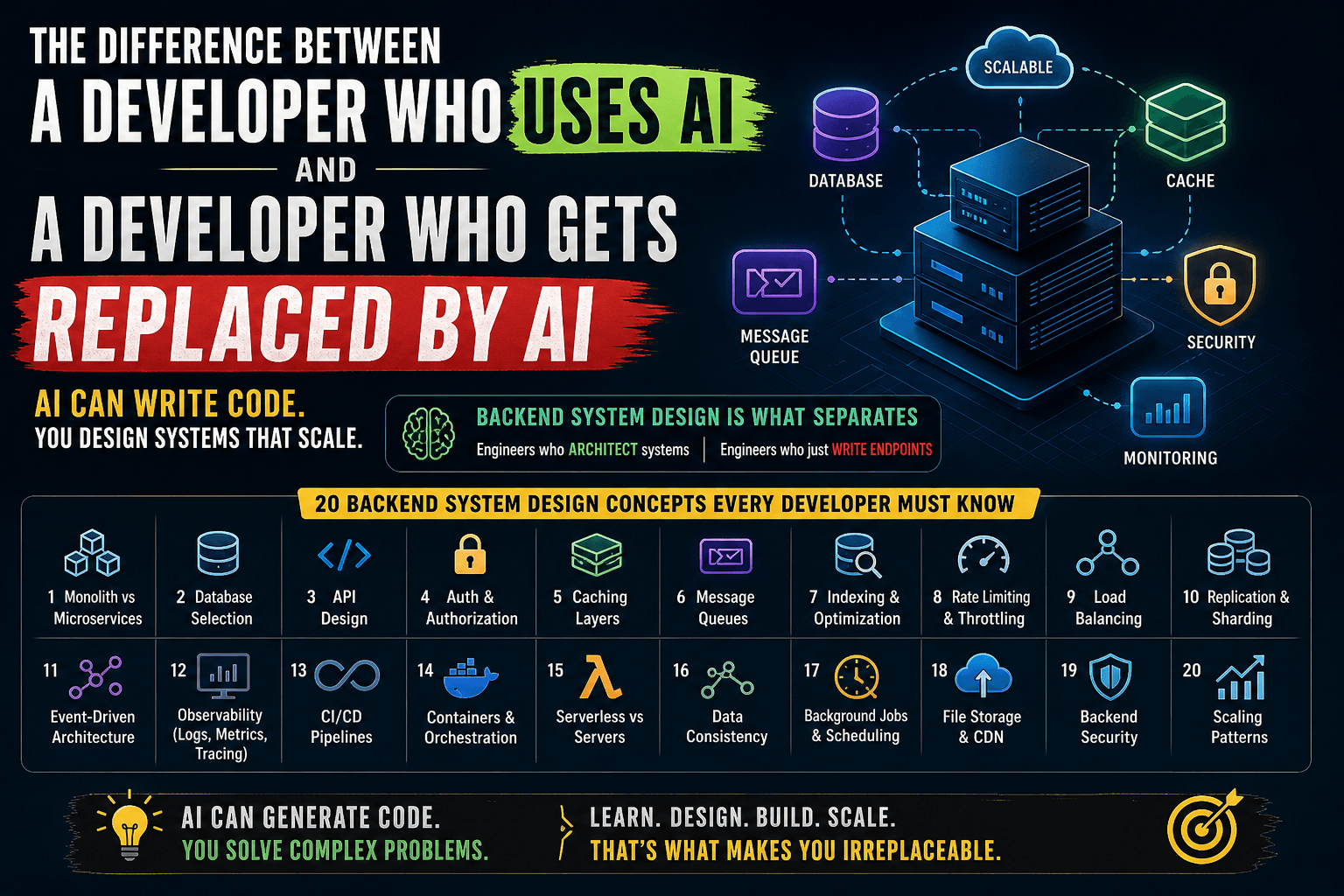
Backend System Design: 20 Concepts Every Developer Must Understand
AI can write your Express routes. It can set up your database schemas. It can even generate your CRUD APIs. But ask it whether your system should use a monolith or microservices at your current scale, and you'll likely get a generic answer that could cost your company months of migration pain. That's the real difference.
1. Monolith vs Microservices
The question isn't "which is better." It's "which is right for you right now."
A monolith is a single deployable unit. All your features — user auth, payments, notifications, reporting — live in one codebase, one deployment, one database.
Microservices split those features into independently deployable services, each owning its own data and communicating over the network.
When monolith wins:
You're a team of 3–10 developers. Your product is still evolving. You don't yet know where the boundaries between services should be. Deploying one thing is simple. Debugging one thing is simple. A monolith lets you move fast when speed matters more than scale.
Shopify ran on a monolith (Ruby on Rails) for years — even at massive scale. They invested in modular architecture within the monolith rather than splitting into microservices prematurely.
When microservices win:
You have 50+ engineers stepping on each other's toes. One team's deployment breaks another team's feature. Different parts of your system have wildly different scaling needs — your search service gets 100x the traffic of your admin panel. You need independent deployment cycles.
Netflix moved to microservices because their monolith couldn't scale to 200+ million users. But they also built an entire platform engineering team just to manage the complexity.
The trap: Most startups adopt microservices too early. You end up with distributed monolith problems — tightly coupled services, shared databases, coordinated deployments — but now with network latency and operational overhead on top.
Real-world rule of thumb: Start with a well-structured monolith. Extract services only when you feel the pain — not when you anticipate it.
2. Database Selection — SQL vs NoSQL vs NewSQL
Picking the wrong database is one of the most expensive mistakes in backend engineering. Migrations are painful, risky, and slow.
SQL (PostgreSQL, MySQL):
Your data has relationships. Orders belong to users. Users have addresses. Products have categories with sub-categories. You need ACID transactions — when a payment is processed, the order status, inventory count, and ledger entry must all update atomically or none of them should.
PostgreSQL is the default choice for most applications. It handles JSON, full-text search, geospatial queries, and scales vertically to surprisingly large workloads.
NoSQL (MongoDB, DynamoDB, Cassandra):
Your data is denormalized and access patterns are well-defined. You're building a product catalog where each item has wildly different attributes. You need horizontal scaling from day one. You're okay with eventual consistency in exchange for availability and partition tolerance.
DynamoDB shines when you know your access patterns upfront — you design your table around queries, not entities. But if your access patterns change frequently (early-stage products), DynamoDB becomes a nightmare of table redesigns.
MongoDB works well for content management, event logging, and prototyping where schema flexibility matters. But "schemaless" doesn't mean "no schema" — it means the schema lives in your application code, and that's often worse.
NewSQL (CockroachDB, TiDB, Spanner):
You want SQL semantics with horizontal scaling. You need globally distributed data with strong consistency. Google Spanner does this with atomic clocks. CockroachDB brings a similar model to the open-source world.
Real-world example: Instagram started with PostgreSQL and still uses it as their primary data store — even at billions of rows. They invested in sharding PostgreSQL rather than switching to NoSQL. The lesson: don't switch databases because of scale fears. Optimize what you have first.
3. API Design — REST vs GraphQL vs gRPC
Each protocol has a sweet spot. Using the wrong one creates friction that compounds over time.
REST:
The default for most web APIs. Resources map to URLs. HTTP verbs map to actions. It's simple, cacheable, and universally understood. Every developer, every tool, every CDN knows how to work with REST.
Use REST when you're building public APIs, CRUD-heavy applications, or when your clients have simple, predictable data needs.
The problem with REST: Over-fetching and under-fetching. Your mobile app needs the user's name and avatar. Your REST endpoint returns the user's entire profile with 30 fields. Your dashboard needs data from 5 different endpoints, so the client makes 5 sequential requests.
GraphQL:
The client specifies exactly what data it needs. One endpoint. One request. No over-fetching. No under-fetching. The client drives the query.
GitHub moved to GraphQL because their REST API couldn't efficiently serve the diverse needs of their integrators — some needed repo metadata, others needed commit history, others needed issue counts. One-size-fits-all endpoints were either too heavy or required too many round trips.
The problem with GraphQL: Complexity on the server. N+1 query problems. Caching is harder (no URL-based cache keys). Authorization per field is tricky. Rate limiting is harder because every query is different.
gRPC:
Binary protocol built on HTTP/2. Strongly typed contracts via Protocol Buffers. Built-in streaming. Extremely fast for service-to-service communication.
Use gRPC for internal microservice communication where performance matters — payment processing, real-time data pipelines, ML model serving. Don't use it for browser-facing APIs (browser support is limited and requires a proxy).
Real-world pattern: Many companies use REST or GraphQL for client-facing APIs and gRPC for internal service-to-service calls. This gives you developer-friendly external APIs and high-performance internal communication.
4. Authentication & Authorization
Getting auth wrong doesn't just break features. It breaks trust.
Authentication (who are you?):
Session-based (cookies): Server stores session data. Cookie holds a session ID. Works great for server-rendered apps. Simple to implement, simple to invalidate. But doesn't scale horizontally without sticky sessions or a shared session store (Redis).
JWT (tokens): Server issues a signed token. Client sends it with every request. Server validates the signature without hitting a database. Scales horizontally because there's no server-side state. But revocation is hard — you can't "log out" a JWT without a blocklist, which reintroduces server-side state.
OAuth2 / OpenID Connect: Delegate authentication to a trusted provider (Google, GitHub, Auth0). You don't store passwords. You get battle-tested security. Use this for consumer-facing apps where "Sign in with Google" reduces friction.
Authorization (what can you do?):
RBAC (Role-Based Access Control): Users have roles (admin, editor, viewer). Roles have permissions. Simple and effective for most applications. But gets messy when you need fine-grained control — "editors can edit only their own posts in the marketing workspace."
ABAC (Attribute-Based Access Control): Permissions based on attributes — user's department, resource's owner, time of day, IP address. More flexible but more complex. AWS IAM policies are ABAC.
API Keys: For service-to-service or third-party integrations. Not for end-user authentication. Always scope them narrowly, rotate them regularly, and never embed them in client-side code.
Real-world mistake: Storing JWTs in localStorage. It's accessible to any JavaScript on the page — one XSS vulnerability and your tokens are stolen. Use httpOnly cookies for JWTs in browser apps.
5. Caching Layers
Caching is the fastest way to make a slow system fast. It's also the fastest way to introduce bugs that are impossible to reproduce.
Where to cache:
Application-level (in-memory): Fastest. Lives in your process memory. Resets on restart. Use for computed values that are expensive to recalculate — configuration, parsed templates, compiled regex. Libraries like
node-cacheor Python'slru_cache.Distributed cache (Redis, Memcached): Shared across all your application instances. Use for session data, rate limiting counters, frequently accessed database results. Redis gives you data structures (lists, sets, sorted sets) — Memcached gives you pure key-value with simpler operations.
CDN cache (CloudFront, Cloudflare): Cache static assets and API responses at the edge, close to users. A user in Mumbai gets your response from a Mumbai edge server, not from your us-east-1 origin.
Database query cache: PostgreSQL and MySQL can cache query plans. But application-level caching usually gives better results because you cache the processed result, not the raw query.
Caching strategies:
Cache-aside (lazy loading): App checks cache first. Cache miss → fetch from DB → write to cache → return. Most common pattern. You control what gets cached and when.
Write-through: Every write goes to cache AND database simultaneously. Cache is always fresh. But writes are slower because you're writing twice.
Write-behind (write-back): Write to cache first, asynchronously flush to database. Fastest writes. But risk data loss if the cache crashes before flushing.
The hard part: Cache invalidation. When the underlying data changes, your cache is stale. TTL-based expiration is simple but imprecise. Event-driven invalidation is precise but complex. "There are only two hard things in computer science: cache invalidation and naming things."
Real-world example: Twitter caches timelines in Redis. When you open Twitter, it doesn't query the database for every tweet from everyone you follow. Your timeline is pre-computed and cached. When someone tweets, the system fans out that tweet to the cached timelines of all their followers.
6. Message Queues — Kafka vs RabbitMQ vs SQS
If your backend does everything synchronously, it's a house of cards. One slow downstream service brings down the whole system.
Why message queues:
User places an order. You need to charge their card, update inventory, send a confirmation email, notify the warehouse, and update analytics. If you do all of this in the same HTTP request, the user waits 3 seconds for a response, and if the email service is down, the entire order fails.
With a queue, you process the payment (the critical path), return a response, and publish an event. Background consumers handle email, inventory, warehouse notification, and analytics independently.
RabbitMQ:
Traditional message broker. Messages are delivered to consumers and deleted after acknowledgment. Supports complex routing (topic exchanges, fan-out, headers-based routing). Great for task distribution — "send these 10,000 emails" where each message is processed exactly once by one worker.
Kafka:
Distributed event log. Messages are appended to partitions and retained for a configurable period (days, weeks, forever). Multiple consumers can read the same messages independently. It's not just a queue — it's an event streaming platform.
Use Kafka when you need event sourcing, when multiple services need to react to the same event, when you need replay capability (reprocess last week's events), or when you're dealing with massive throughput (millions of events per second).
SQS (AWS):
Fully managed. No infrastructure to maintain. Two flavors — Standard (at-least-once delivery, best-effort ordering) and FIFO (exactly-once, strict ordering). Use SQS when you're on AWS and don't need Kafka's features. It's simpler, cheaper, and "just works."
Real-world rule: If you're processing background jobs (send emails, resize images, generate reports), start with SQS or RabbitMQ. If you're building event-driven architecture where events are consumed by multiple services, use Kafka.
7. Database Indexing & Query Optimization
The difference between a 50ms response and a 5-second response is usually one missing index.
What an index does:
Without an index, the database scans every row in the table to find matches (full table scan). With an index, it uses a data structure (usually a B-tree) to jump directly to the matching rows — like using a book's index instead of reading every page.
Types of indexes:
B-tree index (default): Good for equality checks (
WHERE email = 'x'), range queries (WHERE created_at > '2024-01-01'), and sorting. This is your workhorse.Hash index: Only for exact equality. Faster than B-tree for
=checks but useless for ranges or sorting.Composite index: Index on multiple columns
(user_id, created_at). Order matters — this index helps queries filtering byuser_idor byuser_id + created_at, but NOT bycreated_atalone.Partial index: Index only a subset of rows.
CREATE INDEX ON orders (user_id) WHERE status = 'pending'. Smaller index, faster lookups, for queries that always filter by that condition.
Query optimization basics:
- Use
EXPLAIN ANALYZEto see how the database executes your query. Look for sequential scans on large tables — that's your bottleneck. - Don't
SELECT *. Fetch only the columns you need. - Avoid
OFFSETfor pagination on large datasets. Use cursor-based pagination (WHERE id > last_seen_id LIMIT 20). - Beware of N+1 queries — fetching a list of users, then fetching each user's orders in a loop. Use JOINs or batch fetching.
Real-world example: A SaaS app had an endpoint that took 8 seconds. The query was filtering orders by user_id and sorting by created_at. Adding a composite index (user_id, created_at) dropped the response to 15ms. One line of SQL. Massive impact.
8. Rate Limiting & Throttling
Without rate limiting, one misbehaving client can take down your entire API.
Why it matters:
A bot starts scraping your API at 1,000 requests per second. A buggy client retries failed requests in a tight loop. A bad actor tries to brute-force login credentials. Without rate limiting, these scenarios consume your server resources and degrade service for everyone.
Common algorithms:
Fixed window: Allow 100 requests per minute. Simple counter that resets every minute. Problem: a burst of 100 requests at 0:59 and another 100 at 1:01 means 200 requests in 2 seconds.
Sliding window: Smooths out the fixed window problem by considering the overlap between windows. More accurate but slightly more complex to implement.
Token bucket: A bucket holds tokens. Each request consumes a token. Tokens are refilled at a steady rate. Allows short bursts (up to the bucket size) while enforcing an average rate. This is what AWS and most cloud providers use.
Leaky bucket: Requests enter a queue and are processed at a fixed rate. Excess requests are dropped. Smooths out traffic completely — no bursts allowed.
Where to implement:
- API Gateway / Load Balancer: Rate limit before requests hit your application. Nginx, Kong, AWS API Gateway all support this.
- Application level: For business-logic-specific limits (user can create 5 projects per day on the free plan).
- Redis-based: Use Redis counters with TTL for distributed rate limiting across multiple application instances.
Real-world pattern: GitHub's API returns rate limit headers with every response — X-RateLimit-Limit, X-RateLimit-Remaining, X-RateLimit-Reset. Your clients know exactly where they stand and can back off before being throttled.
9. Load Balancing
One server can only handle so much. Load balancing distributes traffic across multiple servers so no single server becomes the bottleneck.
Algorithms:
Round Robin: Requests go to servers in sequence — 1, 2, 3, 1, 2, 3. Simple. Works when all servers have equal capacity and all requests are roughly equal in cost.
Least Connections: Send the request to the server with the fewest active connections. Better when requests have variable processing times — a long-running report query shouldn't get more work piled on.
Weighted Round Robin: Server A gets 3 requests for every 1 that Server B gets. Use when servers have different capacities.
IP Hash: Hash the client's IP to consistently route them to the same server. Useful for sticky sessions without a shared session store. But breaks when a server goes down — all its clients get redistributed.
Consistent Hashing: A more sophisticated version of IP hash that minimizes redistribution when servers are added or removed. Used by caching layers (Memcached) and distributed databases.
Layers of load balancing:
- L4 (Transport layer): Routes based on IP and port. Doesn't inspect the request body. Fast. Nginx in stream mode, AWS NLB.
- L7 (Application layer): Routes based on HTTP headers, URL paths, cookies. Can do SSL termination, request modification, content-based routing. Nginx, HAProxy, AWS ALB.
Health checks: Your load balancer needs to know when a server is unhealthy. Configure health check endpoints (/health) that verify the application can connect to its database, cache, and critical dependencies. Unhealthy servers get removed from rotation automatically.
Real-world example: A food delivery app routes API requests through an ALB with path-based routing — /api/orders/* goes to the order service cluster, /api/restaurants/* goes to the restaurant service cluster. Each cluster auto-scales independently based on load.
10. Database Replication & Sharding
A single database server has limits — both in read throughput and storage capacity. Replication and sharding are how you push past those limits.
Replication (copies of data):
Primary-replica (master-slave): One primary handles all writes. Replicas receive a copy of every write and handle reads. This multiplies your read capacity — if one server handles 5,000 reads/sec, three replicas handle 15,000.
Replication lag: Replicas are slightly behind the primary. A user creates a post (write to primary), then immediately refreshes (read from replica) — the post isn't there yet. Solutions: read-your-own-writes consistency (route reads to primary for the writing user), or use synchronous replication (slower writes but no lag).
Failover: When the primary goes down, a replica is promoted to primary. Automated failover (AWS RDS Multi-AZ) handles this without manual intervention.
Sharding (splitting data):
When your database is too large for a single server — not just reads, but writes and storage — you split the data across multiple servers.
Horizontal sharding: Split rows. Users A-M on Shard 1, N-Z on Shard 2. Or shard by user ID hash. Each shard holds a subset of the data.
Shard key selection is critical. A bad shard key creates hot spots — if you shard by country, and 80% of your users are in India, one shard is overwhelmed while others sit idle. Shard by user ID for even distribution.
Cross-shard queries are expensive. "Give me all orders from last month" touches every shard. Design your schema so that the most common queries hit a single shard.
Real-world example: Discord shards by guild (server) ID. Each shard handles a subset of guilds. Messages within a guild are always on the same shard, so the most common query (fetch messages in a channel) never crosses shards.
11. Event-Driven Architecture
Instead of services calling each other directly, they communicate through events. This decouples services and makes systems more resilient.
Event sourcing:
Instead of storing the current state, you store every event that led to the current state. An account balance isn't stored as "₹5,000." It's derived from a series of events: deposited ₹10,000, withdrew ₹3,000, transferred ₹2,000.
This gives you a complete audit trail, the ability to replay events to rebuild state, and the ability to derive new views from historical events (time-travel debugging).
CQRS (Command Query Responsibility Segregation):
Separate the write model (commands) from the read model (queries). Writes go to a normalized database optimized for consistency. Reads come from a denormalized database (or search index) optimized for query performance.
An e-commerce catalog: writes go to PostgreSQL (normalized, ACID). A consumer processes events and updates Elasticsearch (denormalized, optimized for search). Users search the catalog via Elasticsearch. Admins update products via PostgreSQL.
Saga pattern:
Distributed transactions across microservices. A travel booking saga: reserve flight → reserve hotel → charge payment. If payment fails, compensate by canceling the hotel, then canceling the flight. Each step has a corresponding compensation action.
Two styles — choreography (each service reacts to events) and orchestration (a central coordinator drives the flow). Orchestration is easier to understand and debug but creates a single point of coordination.
When NOT to use event-driven: Simple CRUD apps. Small teams. Early-stage products. Event-driven architecture adds significant complexity — event ordering, idempotency, eventual consistency, debugging async flows. Don't reach for it until synchronous communication becomes a bottleneck.
12. Observability — Logging vs Metrics vs Tracing
You can't fix what you can't see. Observability is how you understand what your system is doing in production.
The three pillars:
Logs tell you what happened. A structured log entry: {"timestamp": "2024-03-15T10:30:00Z", "level": "error", "service": "payment", "user_id": "12345", "message": "card declined", "error_code": "insufficient_funds"}. Use structured logging (JSON) so you can search, filter, and aggregate. Never log sensitive data (passwords, card numbers, tokens).
Metrics tell you how much. Request count, error rate, response time (p50, p95, p99), CPU usage, memory usage, queue depth. Metrics are aggregated numbers over time. They answer: "Is the system healthy right now?" and "Are things getting worse?"
Traces tell you the journey. A single user request might hit the API gateway, auth service, user service, database, cache, and notification service. A distributed trace follows that request across all services, showing you where time is spent. Request took 2 seconds? The trace shows 1.8 seconds was in the database query.
The stack:
- Logging: ELK (Elasticsearch, Logstash, Kibana), Loki + Grafana, or CloudWatch Logs
- Metrics: Prometheus + Grafana, Datadog, CloudWatch Metrics
- Tracing: Jaeger, Zipkin, or Datadog APM — all support OpenTelemetry
Alerting that doesn't burn you out:
Alert on symptoms (high error rate, slow responses) not causes (high CPU). High CPU isn't a problem if users aren't affected. Set thresholds based on SLOs — if your SLO is 99.9% availability, alert when error rate approaches 0.1%. Use severity levels — page the on-call engineer for critical issues, send a Slack message for warnings.
13. CI/CD Pipelines
If deploying to production requires a 20-step checklist and a prayer, your pipeline is broken.
CI (Continuous Integration):
Every code push triggers an automated pipeline: lint → build → test → security scan. The goal: catch broken code before it reaches the main branch. If the pipeline fails, the PR is blocked. No exceptions.
Key principle: your CI pipeline should run in under 10 minutes. Slow pipelines mean developers stop running them or batch large changes, which defeats the purpose.
CD (Continuous Deployment/Delivery):
- Continuous Delivery: Code is always in a deployable state. Deploying to production is a manual decision (click a button) but fully automated.
- Continuous Deployment: Every commit that passes the pipeline is automatically deployed to production. This requires high confidence in your tests.
Deployment strategies:
Blue-green: Two identical environments. Blue is live. Deploy to green. Test green. Switch traffic from blue to green. If something breaks, switch back. Zero downtime. But you need double the infrastructure.
Canary: Deploy the new version to 5% of traffic. Monitor error rates and performance. If everything looks good, ramp to 25%, 50%, 100%. If metrics degrade, roll back. This limits the blast radius of a bad deployment.
Rolling: Update instances one at a time. Old and new versions coexist briefly. Simpler than blue-green but rollback is slower.
Feature flags: Deploy the code but don't enable the feature. Turn it on for internal users, then beta users, then everyone. Decouple deployment from release. LaunchDarkly, Unleash, or a simple database toggle.
Real-world pipeline: GitHub Actions workflow — on PR: lint + unit tests (3 min) → on merge to main: build Docker image + integration tests (5 min) → deploy to staging → run smoke tests → deploy to production (canary 10% → 50% → 100% with automated rollback on error rate spike).
14. Containerization & Orchestration
Containers solved "it works on my machine." Orchestration solved "it works on one server."
Docker:
A container packages your application with all its dependencies — runtime, libraries, system tools — into an isolated, reproducible unit. The same container runs identically on your laptop, CI server, and production.
Best practices:
- Use multi-stage builds to keep images small. Build stage has compilers and dev dependencies. Final stage has only the runtime and your compiled code.
- Don't run as root inside containers.
- Use
.dockerignoreto excludenode_modules,.git, and other unnecessary files. - Pin base image versions.
node:20.11-alpinenotnode:latest.
Kubernetes:
When you have 10, 50, 200 containers, you need something to manage them. Kubernetes handles deployment, scaling, self-healing (restart crashed containers), load balancing, rolling updates, and service discovery.
Core concepts: Pods (one or more containers), Deployments (desired state for pods), Services (stable network endpoint), Ingress (external traffic routing), ConfigMaps/Secrets (configuration).
When Kubernetes is overkill:
You have fewer than 5 services. Your team doesn't have Kubernetes expertise. You're spending more time managing the cluster than building your product. In these cases, use simpler alternatives: Docker Compose for development, ECS or Cloud Run for production, or even a well-configured VM with Docker.
Real-world example: A fintech startup with 3 engineers tried Kubernetes because "that's what you do." They spent 4 months on infrastructure instead of features. They switched to ECS Fargate (serverless containers) and shipped their next feature in 2 weeks.
15. Serverless vs Dedicated Servers
Serverless means you don't manage servers. It doesn't mean there are no servers.
Serverless (Lambda, Cloud Functions, Vercel):
You write functions. The cloud provider handles scaling, patching, availability. You pay per execution — zero traffic means zero cost. Auto-scales from 0 to 1,000 concurrent executions without configuration.
Where serverless shines:
- Bursty, unpredictable traffic — an API that gets 10 requests/hour normally but 10,000 during a sale
- Event-driven processing — resize images on upload, process webhook payloads, run scheduled jobs
- MVPs and prototypes — zero infrastructure management, focus on code
Where serverless hurts:
- Cold starts: First request after idle can add 200ms–2s of latency. Devastating for user-facing APIs that need consistent performance.
- Execution time limits: Lambda caps at 15 minutes. Not for long-running processes.
- Vendor lock-in: Your Lambda functions are deeply tied to AWS. Moving to GCP means rewriting, not just redeploying.
- Cost at scale: At high, consistent traffic, serverless is more expensive than a well-utilized EC2 instance. The per-request pricing that's cheap at low volume becomes expensive at millions of requests.
- Debugging is harder: No SSH into a server. Limited local development experience. Distributed logs across hundreds of ephemeral instances.
Dedicated servers (EC2, VMs, bare metal):
You manage the servers. You handle scaling, patching, and availability. But you have full control — persistent connections (WebSockets), long-running processes, GPU access, custom networking.
Real-world pattern: Use serverless for glue — webhooks, scheduled jobs, event processing. Use dedicated servers for your core API that needs consistent latency, persistent connections, and predictable costs.
16. Data Consistency
In distributed systems, you can't have it all. Understanding the tradeoffs is what separates architects from coders.
CAP Theorem:
In a distributed system, you can guarantee at most two of three properties: Consistency (every read returns the most recent write), Availability (every request gets a response), Partition tolerance (the system works despite network failures between nodes).
Since network partitions are inevitable, the real choice is between CP (consistent but may be unavailable during partitions — banking systems) and AP (available but may return stale data — social media feeds).
Consistency models:
Strong consistency: After a write, every subsequent read returns the updated value. Simple to reason about but expensive in distributed systems. PostgreSQL with synchronous replication.
Eventual consistency: After a write, replicas will eventually converge to the same value. Reads might return stale data for a short window. DynamoDB, Cassandra, DNS.
Causal consistency: If event A caused event B, everyone sees A before B. But unrelated events might be seen in different orders. A middle ground between strong and eventual.
Distributed transactions:
Two-phase commit (2PC): A coordinator asks all participants "can you commit?" If everyone says yes, commit. If anyone says no, abort. Simple but blocking — if the coordinator crashes, everyone waits.
Saga pattern: A sequence of local transactions with compensating actions. More complex but non-blocking and works across microservices.
Real-world example: Amazon's shopping cart uses eventual consistency. If you add an item on your phone and check your laptop immediately, it might not be there yet. But it will be in a few seconds. For a shopping cart, this tradeoff (availability over consistency) is acceptable. For a bank transfer, it isn't.
17. Background Jobs & Scheduling
Not everything needs to happen in the request-response cycle. Offloading work to background processes keeps your API fast and your users happy.
Types of background work:
Fire-and-forget tasks: Send a welcome email after signup. Generate a PDF report. Resize an uploaded image. The user doesn't need to wait for these.
Scheduled jobs (cron): Generate daily analytics reports at 2 AM. Clean up expired sessions every hour. Send weekly digest emails on Monday morning.
Recurring processing: Poll an external API for updates every 5 minutes. Process a queue of pending payments.
Key principles:
Idempotency: Your job might run twice (worker crashed and the message was redelivered). If "send welcome email" runs twice, the user gets two emails. Make jobs idempotent — check if the email was already sent before sending. Use unique job IDs and deduplication.
Retry with backoff: When a job fails (external API is down), don't retry immediately in a tight loop. Use exponential backoff — retry after 1 second, then 2, then 4, then 8. Add jitter (randomness) so all retried jobs don't hit the failing service simultaneously.
Dead letter queues: After N retries, move the failed job to a dead letter queue for manual inspection. Don't let failing jobs clog your main queue.
Timeout: Every background job should have a maximum execution time. A stuck job holding a worker for hours means other jobs wait. Set a timeout, catch it, and fail gracefully.
Tools: Bull/BullMQ (Node.js + Redis), Celery (Python + Redis/RabbitMQ), Sidekiq (Ruby + Redis), AWS Step Functions (serverless workflow orchestration).
18. File Storage & CDN
Storing files in your database or on your application server is a recipe for disaster. As your app grows, it will consume your disk, slow your database, and make deployments painful.
Object storage (S3, GCS, Azure Blob):
Virtually unlimited storage. Highly durable (99.999999999% — eleven 9s). Pay for what you use. Access files over HTTP. This is where user uploads, media files, backups, and static assets live.
Upload patterns:
Direct upload (presigned URLs): Your backend generates a presigned URL — a temporary, scoped URL that allows the client to upload directly to S3. The file never touches your server. This is critical for large files (videos, datasets) that would otherwise consume your server's memory and bandwidth.
Flow: Client requests upload URL → Backend generates presigned URL → Client uploads directly to S3 → S3 notifies backend (via webhook or the client confirms) → Backend records the file metadata.
Chunked uploads: For very large files, split the upload into chunks. If the connection drops, resume from the last successful chunk instead of starting over. S3 Multipart Upload handles this natively.
Processing pipelines:
User uploads a profile photo → S3 triggers a Lambda function → Lambda resizes the image to 3 sizes (thumbnail, medium, full) → stores the resized versions back in S3 → updates the database with URLs.
CDN (CloudFront, Cloudflare):
Cache your files at edge locations worldwide. A user in Delhi downloads your image from a Delhi edge server, not from your us-east-1 S3 bucket. Dramatically reduces latency and offloads traffic from your origin.
Set appropriate Cache-Control headers. Static assets with content hashes (style.a1b2c3.css) can be cached forever. User-generated content needs shorter TTLs or cache invalidation on update.
19. Backend Security
Security isn't a feature you add at the end. It's a mindset you build from day one.
SQL Injection:
The classic. User input is concatenated into a SQL query: SELECT * FROM users WHERE email = '${input}'. An attacker inputs ' OR '1'='1 and gets all users. The fix: parameterized queries. Always. No exceptions. Every ORM does this by default — don't bypass it with raw queries.
SSRF (Server-Side Request Forgery):
Your app fetches a URL provided by the user (preview a link, import from URL). An attacker provides http://169.254.169.254/latest/meta-data/ — the AWS metadata endpoint. Now they have your IAM credentials. Fix: validate and whitelist allowed domains, block internal IP ranges, use a dedicated HTTP client with restrictions.
Secrets management:
Never hardcode secrets in your code. Never commit .env files to Git. Use a secrets manager (AWS Secrets Manager, HashiCorp Vault, Doppler). Rotate secrets regularly. Use different secrets for each environment. Principle of least privilege — a service that only reads from S3 shouldn't have S3 write permissions.
Input validation:
Validate everything. On the server. Client-side validation is for UX — server-side validation is for security. Validate types, lengths, formats, and ranges. Reject anything unexpected. Use schemas (Joi, Zod, Pydantic) to define and enforce input contracts.
Dependency security:
Your app has hundreds of dependencies. Each one is an attack surface. Run npm audit or pip audit regularly. Use Dependabot or Snyk to automatically flag vulnerable dependencies. Pin dependency versions. Review what you're installing — a popular package can be compromised (event-stream incident).
HTTPS everywhere: No exceptions. Use TLS 1.3. Redirect HTTP to HTTPS. Set HSTS headers. Free certificates from Let's Encrypt — there's no excuse.
20. Scaling Patterns
Scaling isn't just "add more servers." It's knowing which part of your system is the bottleneck and applying the right strategy.
Vertical scaling (scale up):
Bigger machine. More CPU, more RAM, faster disk. Simple — no code changes. But there's a ceiling. The largest EC2 instance has 448 vCPUs and 24 TB of RAM. When that's not enough (or too expensive), you scale horizontally.
Horizontal scaling (scale out):
More machines. Your application runs on 10 identical servers behind a load balancer. This requires your application to be stateless — no session data stored in memory, no local file storage. State goes to external stores (Redis for sessions, S3 for files, PostgreSQL for data).
Connection pooling:
Your database can handle 100 concurrent connections. You have 20 application instances, each opening 10 connections. That's 200 connections — your database is overwhelmed. Use a connection pooler (PgBouncer for PostgreSQL) to multiplex thousands of application connections into a smaller pool of database connections.
Graceful degradation:
When the system is under stress, shed load intelligently. If the recommendation engine is overloaded, show popular items instead of personalized recommendations. If the search service is slow, show cached results. The core experience still works — just with reduced functionality.
Circuit breaker pattern:
When a downstream service is failing, stop sending it requests. A circuit breaker tracks failure rates. When failures exceed a threshold, the circuit "opens" — requests fail immediately without waiting for a timeout. After a cooling period, the circuit "half-opens" — a few test requests are allowed through. If they succeed, the circuit closes and normal traffic resumes.
This prevents cascade failures. Without a circuit breaker, Service A waits 30 seconds for Service B to respond, tying up threads. Service A's callers also wait. Soon the entire system is frozen because one service is slow.
Real-world example: Netflix's Hystrix (now replaced by resilience4j) popularized the circuit breaker pattern. When their recommendation service was slow, the circuit breaker tripped and showed a generic "Top 10" list instead. Users got a slightly degraded experience but the app stayed responsive.
Auto-scaling:
Set rules to automatically add or remove instances based on metrics. CPU above 70% for 5 minutes → add 2 instances. CPU below 30% for 15 minutes → remove 1 instance. Use predictive scaling for known traffic patterns — scale up before the morning rush, not during it.
Final Thought
These 20 concepts aren't just interview topics. They're the decisions you make every week as a backend engineer. AI can generate code for any of these patterns. But knowing which pattern to apply, when to apply it, and why one approach fits your specific context better than another — that's the skill that makes you irreplaceable.
Master these, and you won't just write backend code.
You'll architect backend systems.
Save this. Bookmark it. Come back to it every time you're making an architectural decision.